Double Take Delay
When it comes to creating thick, lush vocals or guitars, double tracking is a tried-and-true technique used by musicians and producers for decades. It involves recording the same part multiple times and panning the tracks left and right, which creates a sense of width and depth. But while double tracking can yield great results, it’s also time-consuming and requires a lot of precision. Enter Audio Assault’s Double Take plugin, a tool designed to automate and streamline the double tracking process, saving you both time and effort.
Audio Assault Double Take Plugin
In this review, we’ll dive into the features of Double Take, explore its performance, and discuss whether it’s worth adding to your plugin collection.
What is Audio Assault Double Take?
Double Take is a virtual double tracking plugin that’s designed to make the process of creating wide, full-bodied vocals, guitars, and other instruments a breeze. Whether you’re trying to thicken up a lead vocal, make a guitar riff sound massive, or add depth to other instruments, Double Take mimics the effect of double tracking without needing to record multiple takes.
Instead of manually overdubbing or duplicating tracks and adjusting the timing and pitch, Double Take allows you to create virtual doubles of your recorded part. The plugin subtly varies the pitch, timing, and stereo placement of the duplicated track, mimicking the natural variances that come with true double tracking. The result is a wider, more spacious sound with a touch of warmth and movement.
Key Features of Double Take
-
Double Tracking Simulation: The core feature of Double Take is its ability to simulate the subtle pitch variations, timing differences, and stereo placement that typically occur when you manually double track.
-
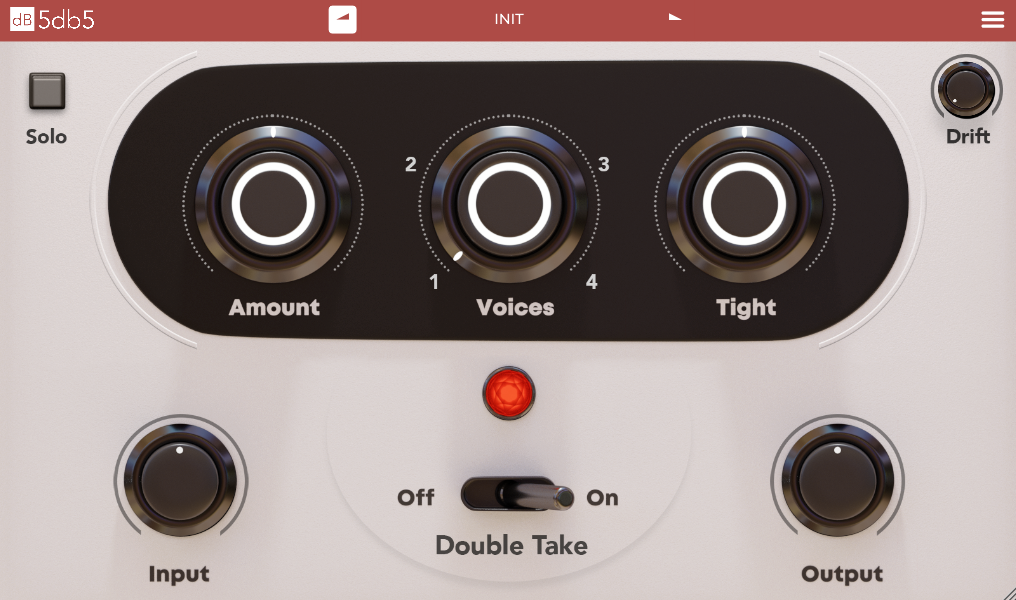
Customizable Parameters: You can adjust the spread, detune, time, and pan of the duplicated track, giving you full control over how much variation is applied. This allows you to tailor the effect to suit the specific needs of your track.
-
Easy to Use: The user interface is straightforward, making it simple to dial in the exact amount of double tracking you want, even if you’re not an expert at sound design. The controls are clearly labeled, and the layout is intuitive.
-
Built-In Stereo Widening: Double Take has an automatic stereo widening feature that adds depth and spatial awareness to your sound. This works particularly well for creating a more expansive feel, especially for vocals or guitar layers.
-
Natural Sound: The plugin is designed to give you natural-sounding double tracking without the digital artifacts that can occur when you use pitch shifters or other tools that don’t mimic the randomness of human performance.
-
CPU Friendly: Despite its powerful capabilities, Double Take is light on CPU usage, making it ideal for large projects where you don’t want to overload your system with excessive plugin demands.
How Does Double Take Perform?
The first thing you’ll notice when using Double Take is how easy it is to dial in the double tracking effect. Simply load the plugin onto your track, adjust the detune and time settings to taste, and let the plugin do the rest. The result is an instant wider, fuller sound with no need to record multiple takes.
One of the strengths of Double Take is how natural it sounds. Unlike other double tracking simulators that can produce overly robotic or artificial results, Double Take subtly varies the pitch and timing, mimicking the imperfections and humanized elements that occur in true double tracking. This makes it sound like you’ve recorded multiple performances, rather than just using a plugin to duplicate a single take.
How It Sounds on Different Instruments
-
Vocals: Double Take works wonders for vocals. You can take a solo vocal track and quickly turn it into a thick, wide performance. With just a bit of detune and time variation, the plugin will create the illusion of multiple vocal takes, perfect for backing vocals or creating a fuller lead performance.
-
Guitars: For guitars, Double Take adds a lush, stereo spread that makes riffs sound massive and expansive. It's a great tool for achieving that "wall of sound" effect without needing to manually record multiple guitar tracks. It’s also perfect for rock and metal genres where a thicker guitar sound is desired.
-
Drums and Other Instruments: While Double Take is primarily used for vocals and guitars, it can also be effective for drums or other instruments that could benefit from a bit of stereo width. Adding a small amount of time variation can give your drum tracks more space and presence in the mix.
Pros of Double Take
-
Easy to Use: The interface is user-friendly, even for beginners. The parameters are clearly labeled, and you can achieve great results with just a few tweaks.
-
Realistic Sounding: Double Take excels at creating a natural, wide sound without artificial artifacts, which is difficult to achieve with some other virtual double tracking tools.
-
Saves Time: You don’t need to record multiple takes. Just one recording and Double Take does the rest, saving you valuable studio time.
-
CPU Efficient: Despite being a relatively powerful tool, Double Take is light on your system, allowing you to use it across multiple tracks in a large project without worrying about performance issues.
-
Flexible: The ability to control various aspects of the effect, such as detune, timing, and panning, means you can use it creatively to shape the sound exactly how you want it.
Cons of Double Take
-
Limited to Double Tracking: While this is the intended purpose of the plugin, it might not offer as much versatility as some other plugins that do both double tracking and other effects (like pitch correction, modulation, or reverb).
-
Not for Every Sound: Double Take is designed to simulate double tracking, so it may not be suitable for all kinds of tracks. For example, it may not be ideal for very fast or technical parts where the small time variations could interfere with timing precision.
-
No Built-in EQ or Effects: Unlike some other stereo widener tools, Double Take doesn’t come with built-in EQ or effects like reverb or delay. You’ll need to pair it with other plugins if you want a fuller processing chain.
Conclusion: Is Double Take Worth It?
Audio Assault’s Double Take is an excellent plugin for anyone looking to create thicker, wider vocals, guitars, and other instruments without the hassle of recording multiple takes. Whether you’re working on a rock track, electronic music, or pop vocals, Double Take can save you time while still delivering that professional, natural double tracking sound.
For producers and engineers who don’t want to spend hours recording multiple layers of the same part, Double Take provides a fast, efficient, and realistic solution. Its user-friendly interface, realistic sound, and CPU efficiency make it a go-to tool for anyone looking to achieve a wide, full mix in a fraction of the time.
If you’re looking for a quick and easy way to create virtual doubles for vocals or guitars, Double Take is a solid choice. It may not be the most versatile plugin in terms of functionality, but it does one thing extremely well—making your tracks sound bigger and more dynamic. And for that reason, it’s definitely worth checking out.