Compressor551

When it comes to mixing and mastering, a reliable compressor is an essential tool for controlling dynamics and adding punch to your tracks. Audio Assault’s Compressor551 plugin is designed to deliver a straightforward, analog-inspired compression experience, with a sleek and intuitive interface that’s easy to use. But as with any plugin, there are both strengths and weaknesses. While the Compressor551 delivers great sound and simplicity, it has some noticeable shortcomings, particularly with its visual meters, which may make it less user-friendly for those who rely on precise level monitoring.
Audio Assault Compressor551 Plugin
In this review, we’ll dive into the Compressor551’s features, its performance, and explore why the lack of dB markers on the input/output meters is a major drawback for those looking for accuracy and ease of use.
What is Compressor551?
The Compressor551 is a vintage-style compressor plugin inspired by the classic DBX 160 hardware compressor, which was widely used in both studio and live environments. Audio Assault’s take on this classic is designed to offer analog warmth, punch, and clarity, all while keeping the interface simple and straightforward. The plugin is equipped with essential controls like threshold, ratio, attack, release, and a make-up gain knob, which makes it perfect for users who want to add some compression without getting bogged down in complex settings.
While its design is minimalistic and accessible, the Compressor551 aims to provide a powerful punch for both mixing and mastering situations.
Key Features of Compressor551
- Analog-inspired compression: Compressor551 is modeled after the iconic DBX 160, known for its ability to add warmth and punch to audio.
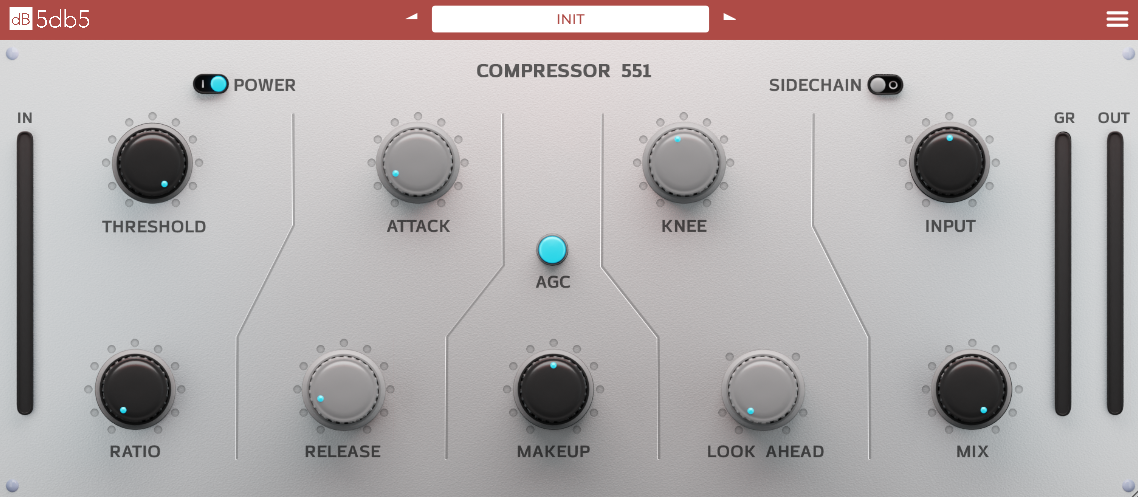
- Simple controls: The plugin has the essential compression parameters—Threshold, Ratio, Attack, Release, and Make-up Gain—making it a straightforward tool that’s easy to dial in.
- Punchy sound: The Compressor551 excels at adding punch to drums, bass, and vocals, which is ideal for genres like rock, pop, hip-hop, and electronic music.
- Saturation: The analog modeling adds a subtle saturation that helps to bring tracks forward in the mix.
- Easy-to-read UI: With a simple, clean layout, the Compressor551 provides an uncluttered user experience.
How Does Compressor551 Sound?
In terms of sound, the Compressor551 delivers exactly what you’d expect from an analog-style compressor: warmth, clarity, and a punchy response. It’s especially effective on percussive elements, such as kick drums, snare, and bass. The ratio and attack settings allow for snappy, tight compression that preserves transients while adding weight and control to the sound.
It’s also a great choice for vocals, where the plugin can tighten up the dynamic range, making sure that louder sections don’t get out of control while also adding a bit of presence to softer passages.
What Sets Compressor551 Apart?
One of the standout features of the Compressor551 is its simplicity. Many compressors can be overly complex, with advanced side-chain options and multiple stages of processing. The Compressor551 keeps things to the point, offering only the most essential controls. For beginners or users who don’t need an excessive amount of tweakable parameters, this makes it an excellent choice for quick, effective compression.
The plugin’s analog warmth is another key selling point. It doesn’t just reduce dynamics—it imparts a bit of harmonic saturation that adds musicality to the sound, giving it a polished, vintage feel. This makes it great for genres that benefit from a more old-school compression sound.
The Lack of dB Markers: A Major Drawback
While the Compressor551 is definitely effective and delivers great results, there is a notable flaw in its design that can make it difficult to use accurately with the absence of dB markers on the visual input/output meters.
Why is This a Problem?
Compression is a dynamic process that requires precise control over input and output levels. Without clear dB markers on the meters, users are left guessing about the actual levels of their signals. You may not always be sure how much gain reduction you’re applying or if your output is clipping, especially when make-up gain is applied. This can lead to:
- Inaccurate level matching: You may not know exactly how much gain reduction is being applied to your signal, making it hard to achieve precise control over dynamics.
- Clipping or distortion: Without a clear reference, it’s easy to push the output levels too high, resulting in unwanted clipping or distortion.
- Frustration for users: For those who rely on visual cues to ensure they’re working at appropriate levels (particularly in a mixing or mastering context), this lack of dB markers can create unnecessary confusion and frustration.
How Does This Affect the Overall Usability?
For beginners or those who don’t have experience using analog-style compressors, this lack of accurate visual feedback can make it hard to gauge how much compression is actually being applied to the signal. In situations where precise control over levels is essential—such as mastering or when working with loudness standards—this flaw can hinder your workflow.
While the Compressor551 still sounds great and offers a lot of flexibility, the inability to accurately monitor levels during compression can make it more difficult to integrate into a professional workflow.
Verdict: Is Compressor551 Worth It?
Audio Assault’s Compressor551 is a great plugin for anyone who needs a simple, analog-style compressor that delivers warmth and punch. It’s ideal for mixing vocals, drums, and bass in a variety of genres. The ease of use and sound quality are impressive, especially considering the plugin’s affordable price.
However, the lack of dB markers on the meters is a significant flaw that makes the plugin harder to use accurately, particularly for users who rely on precise level monitoring in their workflow. This makes it less suitable for professional mastering or mixing engineers who require exact control over their levels.
If you're a beginner or looking for a quick, musical compression tool that adds punch and warmth to your tracks without needing complex controls, the Compressor551 is still a fantastic choice. But if you rely on visual feedback for accurate compression or need a more advanced compressor for critical work, this limitation may make you think twice.
In conclusion, Compressor551 is a solid, effective tool for casual and intermediate users but might fall short for those who need greater accuracy and flexibility.